Introduction to Linux & Basic Linux commands
What is Linux?
Linux is a free and open-source operating system. it is known for its stability, security, and flexibility. It is widely used on servers, personal computers, and other computing devices. Some of the popular flavors of Linux are Ubuntu, Kali Linux, Fedora, etc.
Linux Architecture
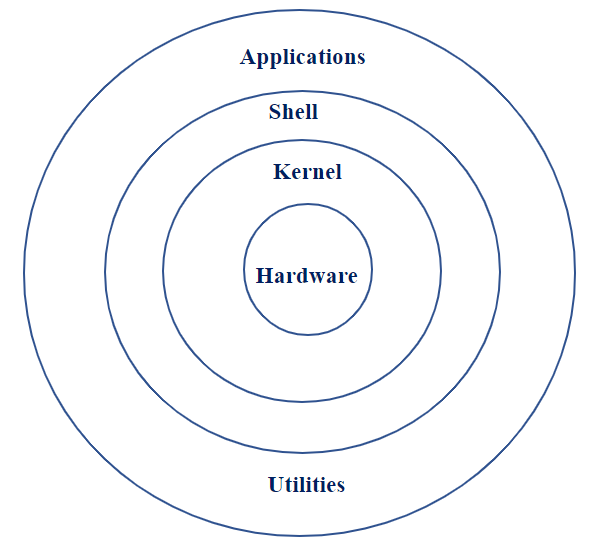
Application - It is the first layer in Linux architecture and consists of various applications that run on the OS.
Ex - Browsers, Mail, MP3 players, etc.
Shell - It is a program that interprets user commands and executes them, allowing users to interact with the system and run applications.
Ex - BASH shell, Korn shell, etc.
Kernel - The kernel is the heart of OS that controls how software and hardware interact.
Hardware - It consists of several peripheral devices.
Ex - CPU, RAM, Mouse, Keyboard, etc.
Utility - A program that helps users perform specific tasks or manage their system.
Basic Linux Commands
Command | Description |
cd | change directory. |
cd . . | moves to the previous directory. |
cd ~ | takes you back to the home directory. |
ls | list directory contents. |
ls -a | lists all the files including hidden files. |
ls -x | lists the content in row-wise format. |
ls -r | lists the contents sorted in reverse alphabetical order. |
ls -t | lists the directory contents sorted by last creation time. |
ls -R | lists all sub_directories under a current directory. |
ls -l | displays all files & directories in long format. |
ls -u | lists the contents based on access time or usage time. |
ls [abc] | lists all the files starting with the letter a/b/c. |
ls [!abc] | lists all the files that don't start with the letter a/b/c. |
ls / | root directory contents will be displayed. |
ls ../ | displays the content of the parent directory. |
ls / | lists the contents of all subdirectories of the current directory. |
ls -d | displays all directories followed by filenames. |
touch | creates an empty file. |
touch -a | changes the access time of a file. |
touch -m | changes the modification time of a file. |
mv | used to move or rename files and directories. |
mv -f | forces overwriting of the target file. |
mv -i | prompts before overwriting the destination file. |
mv -p | preserves the attributes from 1 file to another file. |
rm | removing or deleting 1 or more files. |
rm -i | prompts before deleting each file. |
rm -r | recursively delete a directory and all its contents. |
uname | shows the name and certain features of the system. |
uname -r | displays OS release details. |
uname -m | displays machine details. |
uname -v | displays version details. |
cp | copy file or a group of files across directories. |
pwd | prints current working directory. |
mkdir | creates the directory. |
rmdir | removes the directory. |
echo | displays messages. |
cat | used to concatenate and display files. |
whoami | gives self-login details. |
sudo | lets us use our account and password to execute system commands with root privileges. |
Thank you so much for reading