Shell scripting
Shell Scripts in Linux are an easy-to-use time-saving solution for automating repetitive or complex sets of tasks in system administrators.
. Shell scripting is used to automate daily backups.
Creating your first shell script
To create a shell script to perform all of these tasks, we create a file named
"create-and-launch-rocket" and we move all the commands to this file in the same order that we executed them in
We can now execute the script using the bash command:-
"bash create-and-launch-rocket"
echo $PATH
export PATH=$PATH:/home/michel
To see the location of a command you’d like to see use:-which {command name }
In a shell script, we must set the correct permissions to the file after creating the shell script file then we use:- chmod +x
cron & crontab to automate the backup script
what is cron?cron is a time-based scheduling utility in Linux.
It allows you to automate repetitive tasks by running commands or scripts at specified intervals.
cron is an essential tool for system administrators to improve system efficiency and reduce the risk of human error.
What is crontab?crontab is a file that contains a list of commands or scripts scheduled to run automatically using cron in Linux.
The crontab file can be edited using the crontab command to specify the schedule, command, and output redirection for each job.
crontab is a powerful tool for automating repetitive tasks in Linux and can help improve system efficiency and reduce the risk of manual errors.
Commands of crontab
crontab -l [ to show all the current jobs ]
crontab -e [ to edit or add new jobs ]
cron job format
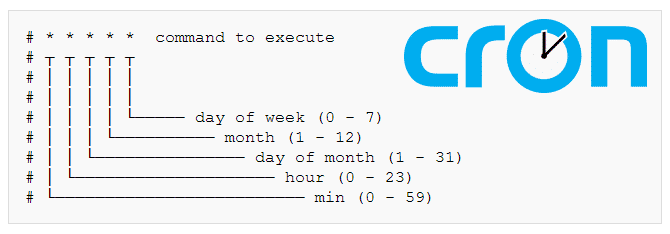
Steps to create & use crontabs.
Create any desired file
Example: I created a task.sh script, which creates a file based on date & time.